Here is a project that has been very useful for my work.
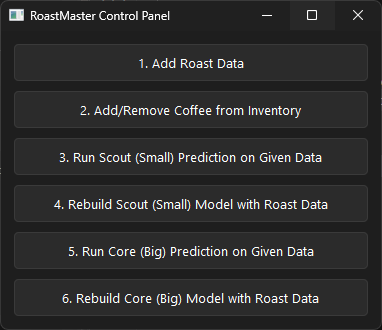
This is the RoastMaster GUI
What RoastMaster Does
RoastMaster is a coffee roasting tool built for an industrial Probat/Burns 540 lb roaster that works in a specific way.
Why This Roaster Is Different
Unlike many roasters where the operator controls gas throughout the roast or automatically follows a continuous curve, this machine follows nine fixed stages. At each stage, you enter a target bean temperature and a fuel percentage, but you don’t control how long the roaster takes to get there. Time is affected by room temperature, humidity, bean condition, and other variables that change day to day.
The Machine Learning Approach
Consistency matters, and relying only on experience makes it hard to account for all of those factors every time. RoastMaster was written to see if logged roast data and simple machine learning models could help make better estimates and improve repeatability. It uses a CatBoost model because it can learn effectively even when some categorical data is missing.
RoastMaster includes two models with different goals.
Scout Model
Scout is a smaller model meant to work with limited data. It focuses on predicting roast behavior when roasting to specific temperatures and times, while adjusting for room and bean conditions. Scout is designed to become useful fairly quickly, even with a small number of logged roasts.
Core Model
Core is a larger model that uses more inputs and predicts more values. It will need a lot more data before it can be trusted across different roast profiles.
Long‑Term Vision
The long‑term goal for Core is to move away from fixed targets and instead roast toward a desired taste profile, given enough roast and cupping data. Given a target flavor and current conditions (room temperature, humidity, bean age, etc.), Core is meant to return the exact numbers needed at each stage of the roast.
View the RoastMaster code on GitHub →
How to Run RoastMaster
1) Install Python 3.10+ (Windows) 2) Clone the repository and open a terminal in the project folder 3) Create and activate a virtual environment: python -m venv venv venv\Scripts\activate 4) Install dependencies: pip install -r requirements.txt 5) Run the GUI: python gui.py
(or run the CLI instead:) python main.py